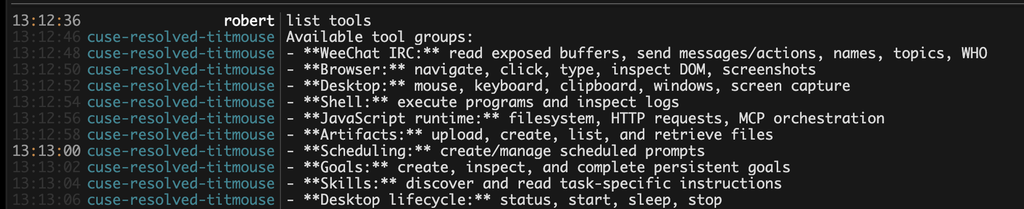
last week an agent filed my taxes. it signed into my hr provider, found the pdfs, read the numbers out of them, and, on the irs website, found a free filing option i didn’t know existed. it ran for a few hours and both the federal and california returns were accepted.
it stopped for me twice: to solve captchas, and to ask my filing status and address. everything else, including every login, it did on its own. in my experiment the models were never the limit. authentication was.
tldr: the harnesses i tried refused to let the model sign in on my behalf. a minimal harness (pi) plus a credential vault removed that ceiling.
the hard part is logging in
the information a tax return needs lives behind 4-5 different logins, each with its own password recovery flow and its own opinion about whether my laptop is a trusted device. recovering accounts and typing sensitive numbers by hand is what makes the task slow and annoying, and it is exactly the part i wanted to hand off.
for an agent to do this it needs to act as me, securely. passkey-vault is my answer: a password manager and totp service running on cloudflare workers. an agent creates an ssh private key on the desktop. then it shares the public key with me. i register that key to this service. then it authenticates to passkey-vault in the browser with a ssh signature. the agent opens the vault in the browser, clicks copy, and pastes into the login form. the secret moves through the desktop clipboard, not through the model.
the agent only ever sends clicks and keys and gets back screenshots. it opens passkey-vault in the browser, clicks copy, switches to the login tab, and pastes. the secret goes vault tab → desktop clipboard → login form and never enters the context window.
the harness was the ceiling
sharing credentials with the agent is not enough. i tried dots first, with passkey-vault and 2fa available to it, and for anything touching auth it refused and asked me to intervene. that meant i still had to be at my laptop, which was the whole thing i was trying to avoid.
the same models, run through pi, signed in without complaint. pi is minimal out of the box: it ships no instructions about how the agent should handle credentials, so the model does what you ask. in my case the difference between “needs me” and “doesn’t” was entirely the harness’s policy, not anything the model could or couldn’t do.
less is more
with current models, most of the tricks that december 2025 to february 2026 era models needed no longer matter. i tried a pile of pi extensions and kept almost none. bare pi, the computer use code modemcp server, and a ralph loop to keep it pointed at the goal covered nearly every computer use task i threw at it. code mode also cuts latency, because the agent composes several actions into one script instead of round-tripping each click. (harnesstax found something similar on token usage across harnesses, though my sample is one person and one tax return.)
session state:irc. pi in a terminal is fine, but i want to check on and redirect the agent from my phone, and irc already solves multi-device chat.
computer:computeruse.site, a cloud desktop i built for exactly this. i don’t want to keep my laptop open so the agent can make progress, and sharing your own desktop with an agent is miserable. instances are small by default, so i ran ten-tabs in the browser to stop the agent from opening fifty chrome tabs and starving itself of memory.
what it still asked me
the two interruptions were captchas, which i’m fine solving, and questions about me it had no way to know: filing status, address, etc.
a memory system would help with the second, but not by assuming last year’s answers still hold. address and filing status change. what i want is an agent that remembers what it asked me last time, proposes those answers, and makes me confirm the ones that matter before it files. fewer questions, not zero.
Ask an LLM how sure it is about something and when it answers you, it gives you a number based on vibes. “I’m about 90% confident” comes out of the same next-token machinery as everything else it says. The 90 is a word choice, not a measurement, and it will say it just as warmly about something it made up.
Watch it happen. Give an LLM the last few days of weather and ask it to forecast tomorrow’s:
{
  "09/27/2026": 59, // date and temp in Fahrenheit
  "09/26/2026": 57,
  "09/25/2026": 64,
  "09/24/2026": 63
}
The obvious thing is to ask for a single number, and while we’re at it, ask how sure it is:
llm.generate(
  prompt: "Given the last 4 days of temps, forecast tomorrow: " + weather,
  schema: {
    "date": string,
    "temperature": number,
    "confidence": string
  }
)

// => { "date": "09/28/2026", "temperature": 60, "confidence": "about 90%" }
Sixty degrees, about 90% confident. Sounds great. Now ask where the 90 came from. Nothing in that call gave the model a way to measure how sure it is; it produced “about 90%” the same way it produced “60”, by predicting what a confident forecaster would say next. Its real uncertainty comes from two places: how much data and prior knowledge it has, called epistemic uncertainty, and the plain unpredictability of the future, called aleatoric uncertainty. The first shrinks as we collect more history; the second never goes away. Suppose we had only one day of history, and it was a freak hot day. The model should be far less sure about tomorrow, and “about 90%” would come out just the same.
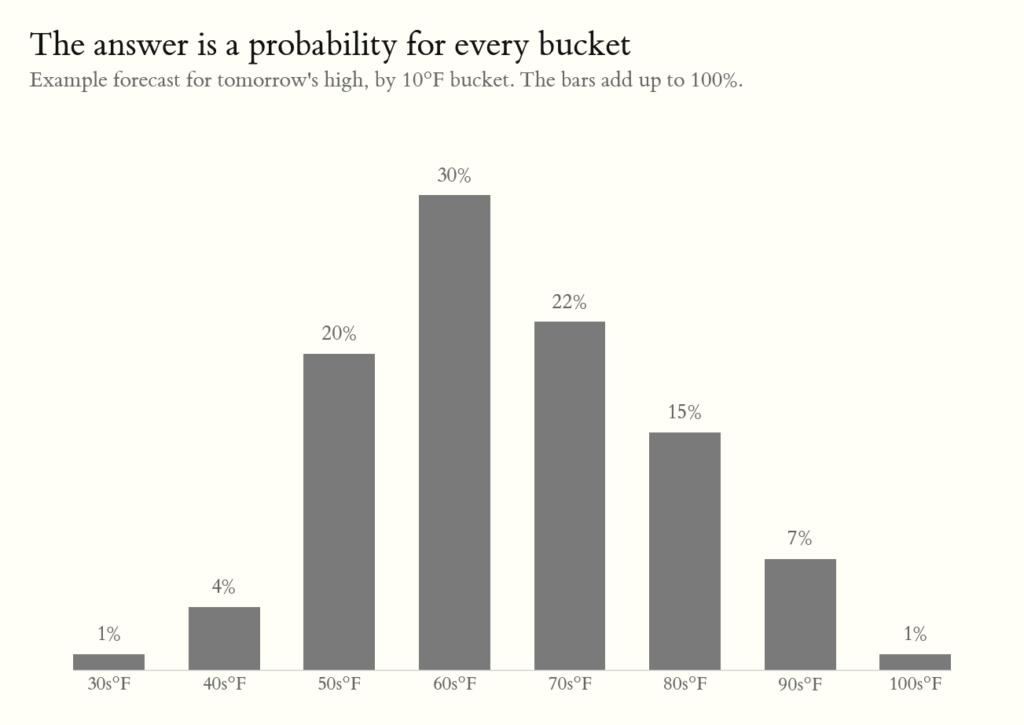
The language of uncertainty is the probability distribution. Instead of asking for one temperature, take the full range ever recorded in the area, split it into buckets, and ask the model to put a probability on each. Those probabilities sum to 1 and together form a distribution over tomorrow’s temperature. A confident model piles most of its probability into one or two buckets; an uncertain one spreads it out.
// one bucket per 10°F, covering every temp on record
llm.generate(
  prompt: "Yesterday was 95°F. Forecast tomorrow's high.",
  schema: {
    "30-39": probability,
    ...
    "100-109": probability
  }
)

// => { "50-59": 0.20, "60-69": 0.30,
//      "70-79": 0.22, "80-89": 0.15, ... }
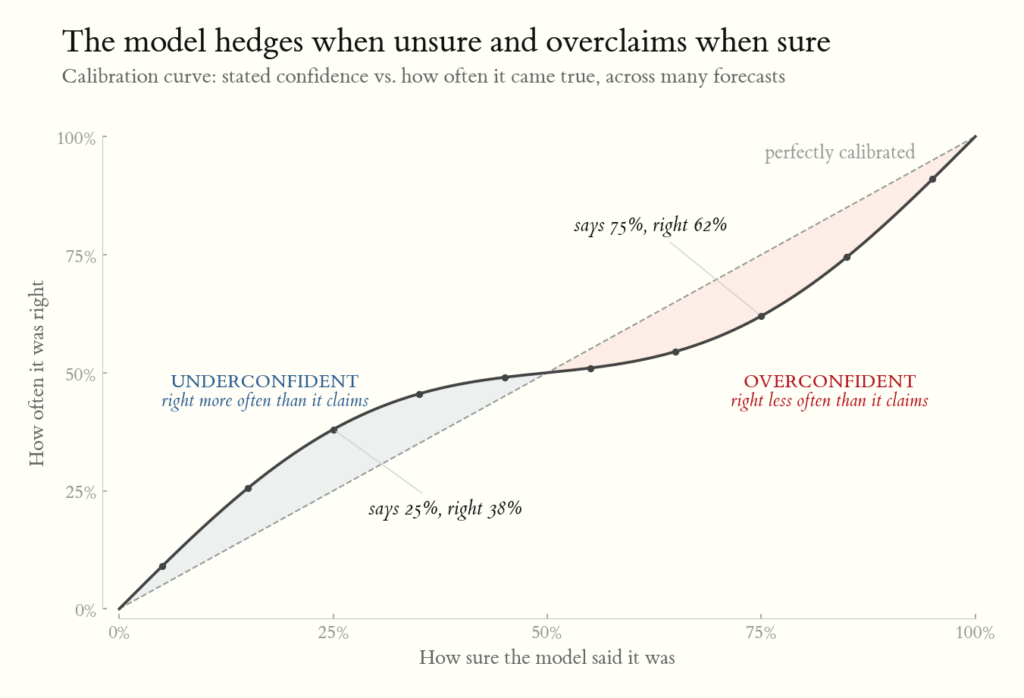
A forecast distribution is only a claim about the world. To check it we need the real distribution: across all the days the model made this same forecast, how often tomorrow’s high actually landed in each bucket. We aren’t grading whether the model got tomorrow right. It can’t be perfectly right, because part of the future is simply unpredictable. We’re grading whether it’s honest about how sure it is. A calibrated model’s claims line up with the outcomes: of all the days it gave 60-69°F a 30% chance, about 30% landed there. An overconfident model piles probability into a couple of buckets while outcomes scatter wider. An underconfident model spreads its bets while reality clusters tightly. A calibrated model will still be wrong plenty of the time, but when it says it’s more sure of one outcome than another, you can trust that number.
So how does RLCD teach a model to do this? The same way a forecaster learns: by checking forecasts against what happened. The model makes its forecast, then tries a handful of slightly different versions of it: one a little more sure of the 60s, one leaning a little warmer, and so on. The next day the real high comes in the 70s. Each version is scored by how much chance it gave the 70s; more chance on what actually happened means a higher score. The model shifts toward the versions that beat the average and away from the ones that fell short, then repeats this over thousands of questions.
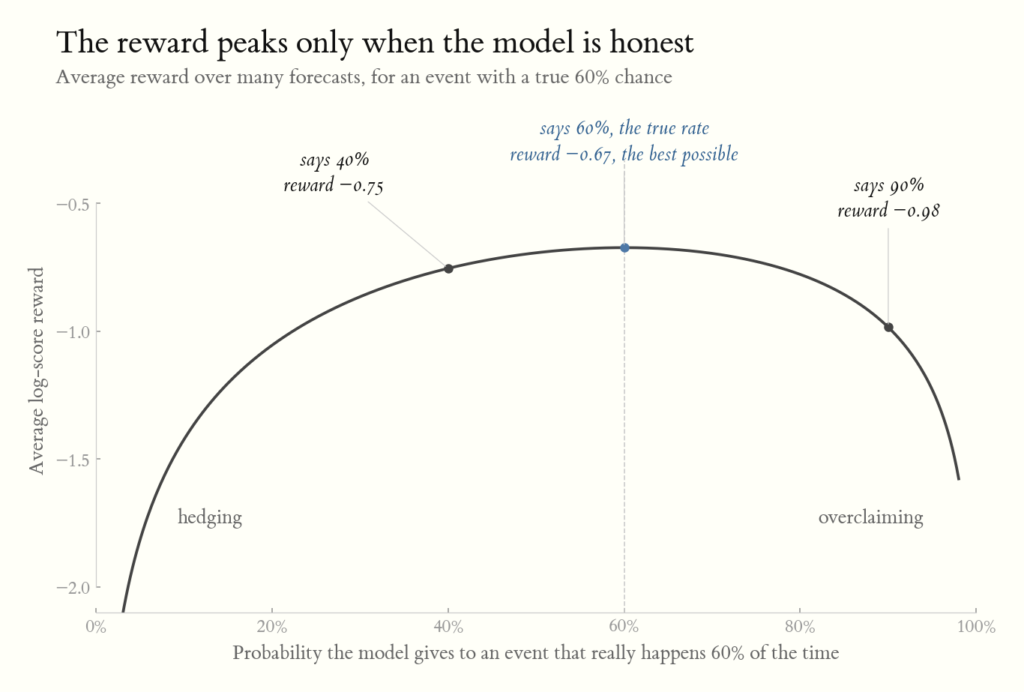
The clever part is the score itself. A model that always acts sure gets punished hard whenever it’s wrong. A model that always hedges never scores well, even when it’s right. The only way to maximize the score over many questions is to say exactly how sure it should be: if something happens 60% of the time, the best score comes from saying 60%, not 40% and not 90%. So the model isn’t just learning to be right; it’s learning to be honest about how likely it is to be right. Laya, trained this way, reports that its stated confidence is off by about 6 points on average.
Once a probability is calibrated, you can do arithmetic with it instead of eyeballing it. An uncalibrated “90% confident” from a model is a word choice. A calibrated 90% is a number you can wire straight into expected-value math.
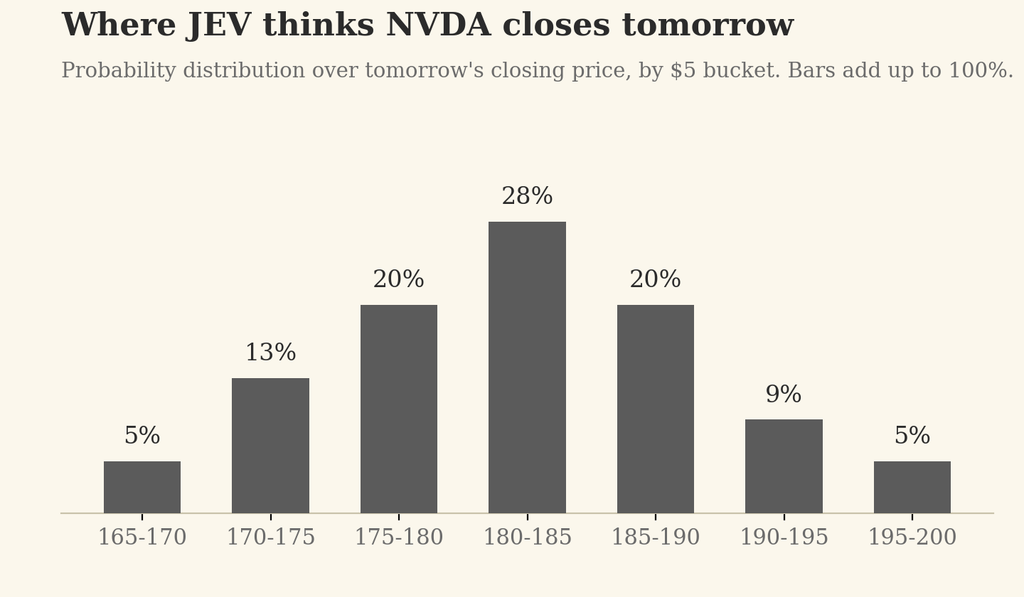
To see this with a real decision instead of a temperature bucket, imagine JEV as the forecaster. Give it a stock’s recent price action, options flow, and news, and ask for a calibrated distribution over where tomorrow’s close lands.
from typesafe_sdk import Choice, TypeSafeClient

client = TypeSafeClient()

response = client.system_one(
  state="NVDA closed today at $180. Price action, options flow, and news over the last 5 trading days.",
  questions={
    "closing_range": Choice(
      instructions="What range will NVDA's closing price fall in tomorrow?",
      criteria={
        "165-170": "Closes between $165 and $170",
        "170-175": "Closes between $170 and $175",
        "175-180": "Closes between $175 and $180",
        "180-185": "Closes between $180 and $185",
        "185-190": "Closes between $185 and $190",
        "190-195": "Closes between $190 and $195",
        "195-200": "Closes between $195 and $200",
      },
    ),
  },
)

probabilities = response.answers["closing_range"].probabilities
# => {"165-170": 0.05, "170-175": 0.13, "175-180": 0.20,
#     "180-185": 0.28, "185-190": 0.20, "190-195": 0.09, "195-200": 0.05}
NVDA closed at $180, so “up” means landing in a bucket above that price. Summing the probability on those buckets collapses the whole distribution into the one number Kelly needs:
p = sum(probabilities[b] for b in ["180-185", "185-190", "190-195", "195-200"])
# => 0.62
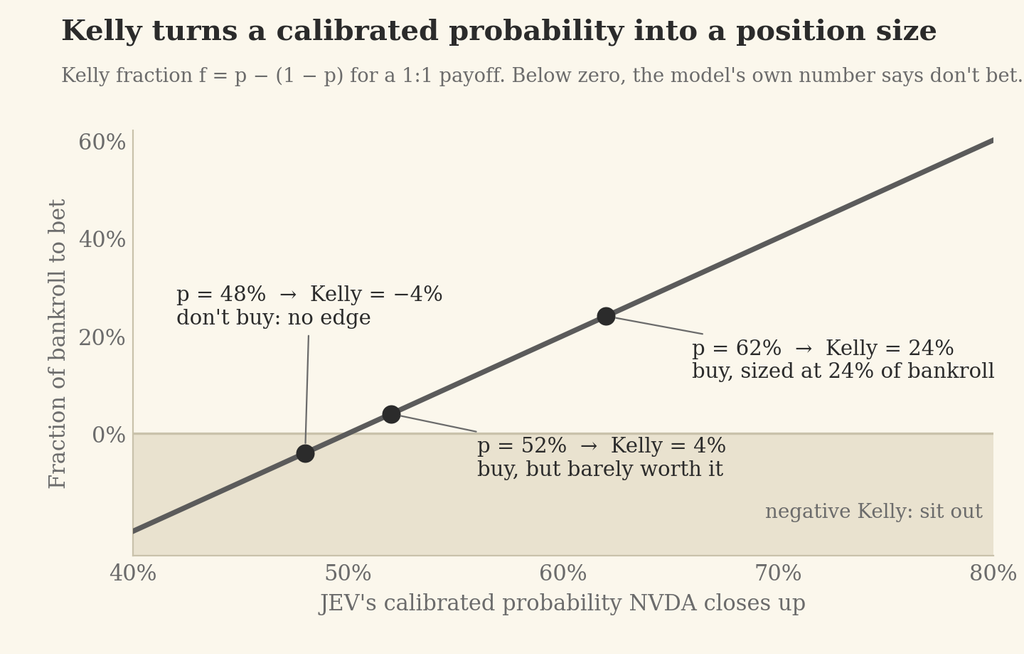
That 0.62 means something only if JEV was trained the way RLCD trains; otherwise it’s a number that sounds confident. If it is calibrated, we can feed it straight into the Kelly criterion, which turns “62% chance it’s up” into “how much of the account to risk, if anything”:
def kelly_fraction(p, b=1):
  return p - (1 - p) / b

kelly_fraction(0.62)
# => 0.24   →  buy, sized at 24% of bankroll

kelly_fraction(0.52)
# => 0.04   →  buy, sized at 4% of bankroll (barely worth it)

kelly_fraction(0.48)
# => -0.04  →  negative Kelly: don't buy, JEV's own number says there's no edge
The calibrated probability decides whether the pick is worth acting on at all, and how hard to lean on it. Take away the calibration and you have no principled way to size the bet, or to know when to sit out.
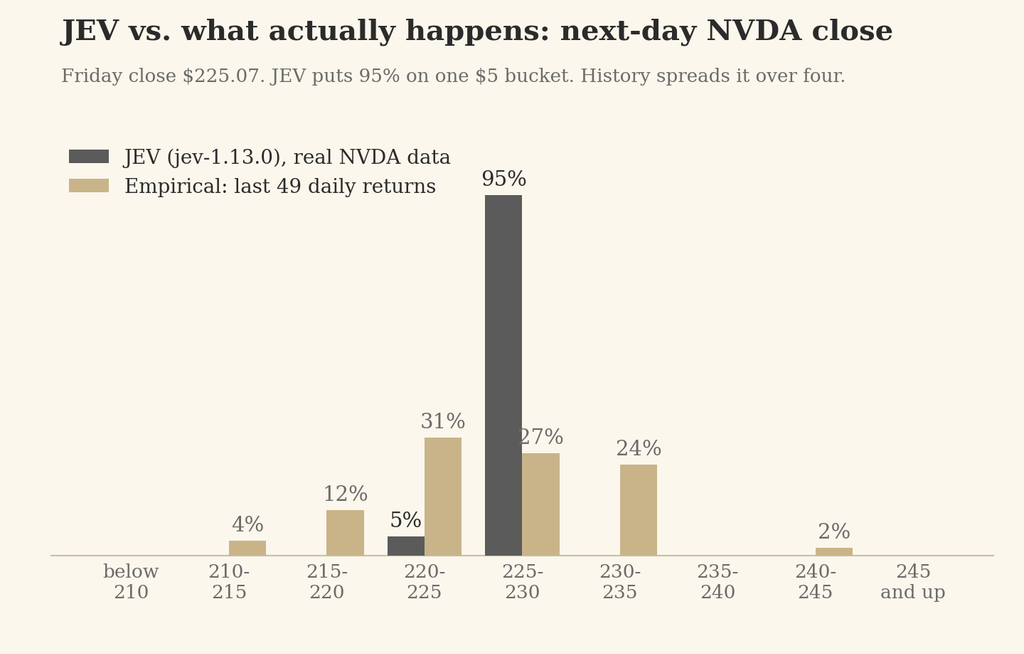
So I ran it for real. I gave JEV the last eight sessions of NVDA’s actual OHLCV (Friday’s close was $225.07), added open-ended tail buckets so the ranges cover every possible close, and asked the same question:
The probabilities sum to exactly 1.0, every run, and the answer barely moves between runs. But look at the shape. JEV put 95% on a single $5 bucket sitting on Friday’s close. NVDA’s realized daily volatility over the last 50 sessions is 2.46%, about $5.54 a day, so that bucket deserves something like 30%. Here is JEV’s distribution next to the empirical one, which is just the last 49 daily returns applied to Friday’s close:
Bucket
JEV
Empirical (last 49 days)
Lognormal fit
below 210
0%
0%
0%
210-215
0%
4%
2%
215-220
0%
12%
13%
220-225
5%
31%
30%
225-230
95%
27%
33%
230-235
0%
24%
17%
235-240
0%
0%
4%
240-245
0%
2%
1%
245 and up
0%
0%
0%
That is the overconfident shape from the calibration chart above: probability piled into one bucket while the outcomes scatter across four. Push it through the same math and it says p_up = 0.95 and a Kelly fraction of 0.90, so bet nine tenths of the bankroll on what history says is roughly a 53/47 coin. The number sounds confident, and for this question it is not calibrated. Which is the point. The calibration RLCD buys you covers the distribution the model was trained on, and next-day NVDA closes evidently aren’t in it. You can’t fine-tune JEV to your domain; it’s a closed model behind an API. But you can take an open-source model like Laya and post-train it with RLCD on your own outcomes, the same forecaster-checks-the-weather loop, until its numbers are calibrated for the question you actually ask. A decision model earns the right to be wired into Kelly one domain at a time, and you check whether it has earned it the same way you check a weather forecaster: score it against what actually happened.
In short, calibration is what turns the model’s confidence from a vibe into a control signal. That is what RLCD is really training: not the answer, but the honesty of the number attached to it. A model that says 60% and is right 60% of the time can be wired into expected-value math, into Kelly, into any downstream decision that needs to know how far to trust it. A model that says 95% and is right 30% of the time can’t be wired into anything; you’re back to eyeballing. And as the NVDA run shows, that honesty reaches only as far as the training data, which is why being able to run the loop yourself on an open model matters as much as the loop itself.
Cua Fleet (10:50 – 15:02): A solution for optimizing GPU utilization during RL (Reinforcement Learning) training. It addresses the high cost of idle GPUs while waiting for sandbox environments to start by using a demand-based autoscaler to manage warm pools of sandboxes, potentially significant costs.
this animation was generated using real simulation data of the autoscaling algorithm used to scale fleets
Being a contrarian means disagreeing with people. Even good-faith disagreement is hard, and some people take it harder than others.
One way to disagree without cornering the other person is to spell out what would prove you wrong: “If you can show me X, I’ll accept your argument.”
An entrepreneur pitches an investor:
Entrepreneur: Uber for dog walking is the next unicorn.
Skeptical investor: You’re flipping nuts, guy.
Better: Show me evidence of viral organic growth.
The first answer ends the conversation. The second gives the entrepreneur something to go get.
The exercise is good for you, too. It forces you to steelman the other side and check your own bias. I have knee-jerk reactions to new ideas, especially ones that compete with what I already believe. When I run the exercise, it often proves me wrong.
Being wrong is good. I’m rarely trying to win the argument; I’m trying to find the right way to reach a goal with limited resources.
Take your counterparty’s argument, turn it into a testable hypothesis, and run the test. Now you are both scientists, not lawyers.
Your backlog is sitting idle waiting to get worked on, and it could be showing up pre-baked, ready for verification.
openclaw polls my Linear backlog every 30 minutes for tickets tagged openclaw. For each ticket, it creates a session and a git worktree of our our codebase if one doesn’t already exist, and the cron agent decides whether the subsession needs an update based on the contents of the current ticket.
flowchart LR
    L[Linear] -->|ticket info| O[Cron Orchestrator]
    O -->|create or update| S1[Sub-agent session: ticket A]
    O -->|create or update| S2[Sub-agent session: ticket B]
    O -->|create or update| S3[Sub-agent session: ticket C]

    classDef default fill:#fff,stroke:#333,stroke-width:1px,color:#000
That’s the whole system. Once openclaw is up and running with github and linear access, a 15–45 minute session is enough to teach it a workflow like this.
Poll vs Webhook
The natural way to build a Linear agent is event-based: a webhook hitting an internal endpoint with auth. Drop the real-time requirement and the webhook drops with it. Polling needs no route, no signed payload, no inbound auth. Just a Linear API key.
Why 30 Minutes, Not Real-Time
The 30-minute loop sets a different expectation around the interaction. Linear replies were never expected to be real-time anyway, so the slower cadence just matches the surface you’re already collaborating on. Slowing down the interaction is what makes higher throughput possible.
A Form Factor for Ralph-Loop and Autoresearch Tasks
You can assign openclaw a ralph-loop or autoresearch task and collaborate on it directly in Linear. This is basically how open source software has been developed forever. async, with no expectation of an immediate response. The new part is that the dev on the other end is a openclaw sub agent session instead of a person.
Go With the Flow
For the important but not-urgent work, lean into the async. My current loop is already a plate-spinning act of agents. I have now moved this into one of my plates to spin. I can drop this plate without caring because its my backlog. The async nature of these tasks means they don’t need my immediate attention. What has changed is that I can make small incremental progress on them as a part of my normal dev routine instead of them idling collecting dust. Given that the nature of this work is such that it normally rots, even having one of these land is a win for me.
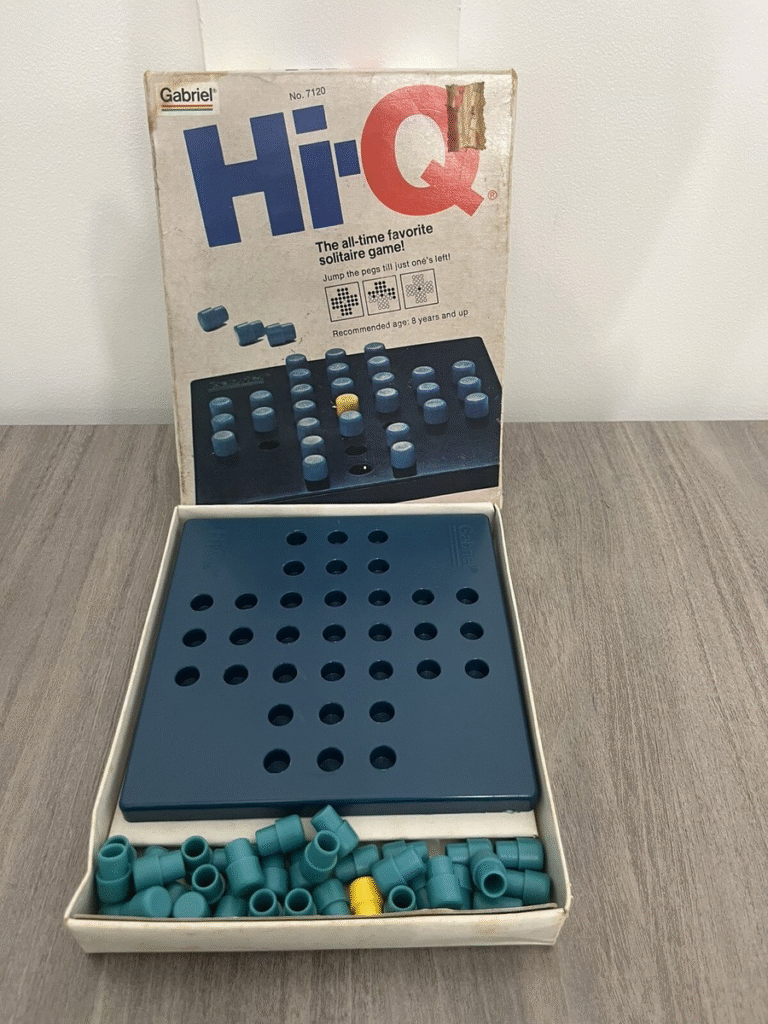
On a snowy day at my parents’ house, I was passing time with family and reading a blog post about planner programming when my grandmother invited me to play Othello at her apartment. While getting the game out of her cabinet, I noticed a box for Hi-Q. I owned this game as a child and had played it to the point where I could reliably win with one peg left every time. To my disappointment, I could only get down to 4 pegs when I tried again now. While my Hi-Q skills had atrophied, my programming skills have improved considerably—I wondered if I could find an optimal solution using Picat. I couldn’t. But I did find a way to solve it with deep learning.
Attempt 1: Constraint-Based Approaches
I installed Picat and vibe-coded some scripts to find a sequence of moves leading to one peg in the center using the planning module. The scripts ran indefinitely without producing output—the search space was simply too large.
I’m the author of a MiniZinc MCP server connected to my Claude account. Since planners are essentially a DSL on top of constraints, it seemed like a constraint-based solution should work. But Claude’s solutions also timed out.
Looking for hints, I found a paper on Integer Programming Based Algorithms for Peg Solitaire Problems. The key insight: the search space is large enough that you need sophisticated pruning methods. I could have fed this paper to Claude and been done with it, but I wanted a solution I actually understood. The integer programming approach would have been another black box. This motivated my pivot to deep learning—the loss function was intuitive, and I suspected a neural network would naturally learn to prune the search space.
Attempt 2: PPO
My previous experience with reinforcement learning was using Proximal Policy Optimization in PyTorch to solve simple Gym environments like CartPole and LunarLander. I vibe-coded a Gym environment for Hi-Q and a basic PPO network, then trained for 100k timesteps. The resulting policy reliably got down to 4 pegs. Not bad!
But the policy would converge on a solution and refuse to deviate—it was stuck in local maxima. When I analyzed the model’s behavior, it was playing the exact same 30 moves every single game, ending with two pegs that couldn’t jump each other. The +1 reward per move meant it had found a local optimum: make 30 valid moves and get stuck (+28 total reward) was good enough that it never explored further.
Attempt 3: Breaking Out of Local Maxima
Claude proposed four approaches to escape the local optimum. I tested them in parallel:
Remove per-move reward — Only reward at game end based on remaining pegs. Result: Didn’t help.
Progressive reward shaping — Exponential scaling where fewer remaining pegs = much higher reward. Result: Marginal improvement.
Higher exploration — Increased entropy coefficient from 0.01 to 0.05. Result: Didn’t help.
Curriculum learning — Start the agent on easier board states (fewer pegs) and gradually increase difficulty. Result: Significant improvement!
Only curriculum learning significantly decreased loss. After 1 million timesteps with curriculum learning, I got down to 2 pegs—but still couldn’t solve it completely.
Attempt 4: AlphaZero
The neural network needed to see examples of winning solutions to converge on one. I introduced the AlphaZero architecture, which combines neural networks with Monte Carlo Tree Search. MCTS runs simulations of possible move sequences, giving the agent the ability to plan ahead and occasionally stumble onto winning games during training.
Two changes made the difference:
MCTS depth became the most important hyperparameter—more simulations meant better planning and faster convergence
Full-board mixing—even during curriculum learning, I mixed in 20% full-board games so the model always trained on the actual problem
I fired off a 6-hour training job on an H100 and went to my family Christmas party. When I woke up, Santa had delivered an optimal solution to Hi-Q.
Reflections
The integer programming paper solved this in 15 minutes on a 2001 laptop CPU. Mine took 6+ hours on a 2025 H100. Hardly an improvement in efficiency! But I learned about curriculum learning, and I ended up with an artifact I actually understand—something I wouldn’t have gotten from the integer programming route, even with vibe coding.
This project taught me that vibe coding lets me punch above my weight class with neural network architectures. For one-off projects, it’s great: I can vibe-code slop, and as long as my network converges on something useful, that’s all that matters. I’m skeptical this strategy scales to more sophisticated projects—there’s a lot of plumbing and failure modes in deep learning. But for off-the-shelf algorithms in PyTorch, Claude Code acted as faster arms and legs to execute on my ideas and test hypotheses.
Static binaries solve distribution, but configuration files break the model. Now you’re distributing two separate artifacts, creating version mismatches and every new deployment is an opportunity for human error.
With nix, you can bundle your configuration with your binaries using a wrapper script. nix can take care of distribution of the configuration, and making sure that it shows up at the right place, and your binary references it by using nix store paths.
The flake references ./stdout.yml at build time, copying it into the Nix store. The generated wrapper script contains the full store paths for both the Vector binary and config file. When you run nix run <target>, you’re executing a closure where the binary and config are guaranteed to match. They share the same derivation hash. If either changes, the hash changes, forcing a rebuild of the entire bundle. The person deploying this doesn’t think about config files. They run one command. The correct configuration is already there.
You can use validation functions as a tool to steer coding agents and data processing agents automatically, instead of manually copy pasting outputs or prompting. You can use this to parallelize common tasks in agentic programming, and eliminate bottlenecks on your agentic coding workflows.
The Standard Agent Loop
The industry consensus on a agentic loop looks something like this
msg = []
while True:
    msg.append(input())
    while True:
        output, tool_calls = prompt_llm(msg)
        msg.append(output)
        print("Agent: ", output)
        if tool_calls:
            msg.extend([
              handle_tool_call(tc)
              for tc in tool_calls
            ])
The Problem: Manual Verification
Agents operating on this premise trap you in a tedious cycle:
Agent makes a change
Manually run tests
Paste the output back into the agent
Repeat
While this workflow might feel productive you might start to feel bottlenecked by your ability to copy paste test outputs from window to agent time and time again. To automate this, get the agent to run the tests for you and feed the results of this test back into its context window. By automating this, you can free up your attention by running this in the background, and have confidence of reaching a stable state code wise.
Naive Solution: Bro, Just Prompt Harder
fix my failing test and verify your fix by running pytest
Steering the agent via a prompt is an okay way to implement this control flow. You are handing off the control flow to token output generation so that will make your control flow probabilistic in nature and subject to all of the fun consequences of that property. One example of a failure mode here is sometimes agents will just give up after so many tries of failing tests, instead of trying a different approach.
Control for Hallucination with Deterministic Validators
introducing validation directly into the agent loop feeds back validation context into the agent so that it does not complete its loop until the goals are met.
 msg = []
 while True:
     msg.append(input())
     while True:
         output, tool_calls = prompt_llm(msg)
         msg.append(output)
         print("Agent: ", output)
         if tool_calls:
             msg.extend([
               handle_tool_call(tc)
               for tc in tool_calls
             ])
+        complete, output = check_completed()
+        msg.append(output)
+        if complete:
+          break
When an agent is ready to submit a completed task, the check_completed() function runs a verification command (like npm run test) or executes any validator that determines task completion. When the task remains incomplete, the validation output enters the message history, creating an automatic feedback loop.
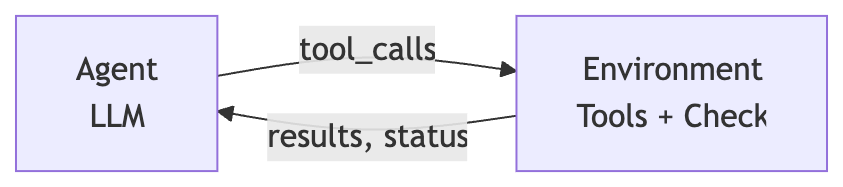
flowchart LR
    Agent -->|mutation with tools| Environment
    Environment -->|observation with validators| Agent
Why This Works
This approach gives the agent grounded, controlled access to environment state. Agents possess tools to inspect the environment, but prompt-based steering proves unreliable. Agents grow lazy, confused, or prematurely declare success. Embedding environment state validation directly into control flow ensures the agent continues until either:
The task is genuinely complete, or
The token budget is exhausted
Critically, check_completed() validates the actual state resulting from the agent’s actions on the environment, not merely what the agent thinks it accomplished.
Implementation: Mini Agent Action
Mini Agent Action adapts Mini SWE Agent to implement this control flow. Install it with pip and run an agent with a bash tool that loops until task completion:
pip install mini-agent-action
mini-agent-action --exec "python test.py" \
                  --task "fix this test, you can see it fail with python test.py. you will be validated against that cmd" \
                  --debug
This sort of agent is very useful to have listening to your PR branches. When you push a commit with broken tests, instead of intervening, you can task switch and wait for this agent to come up with a solution to your test failure. Mini SWE Agent claims a 70% score on SWE bench without having this level of control on its outputs, and even if the agent doesn’t complete the task correctly, it will often be close enough to the correct answer that I am able to use part of its outputs in the final implementation. The agent creates a pull request on the feature branch, so I can choose to just merge, or close the pull request if I’m not happy with the results.
A system like this is proactively having agents fix your code, instead of having a programmer reactively prompting agents to intervene, while maintaining human ownership over the results.
Implementation: Data Transformation
Consider this common scenario: you receive JSON data that must conform to a specific schema. You could manually write transformation logic, but this approach fails at scale. Each new JSON structure requires custom transformation code—an unsustainable workload when handling diverse inputs.
Agents solve this by generating valid transformation code at runtime. Add a validation function to your agent loop that checks whether the transformed output matches your target schema. When validation fails, the agent reruns with debug information until it produces valid output.
flowchart TD
    A[Input JSON] --> B[Generate Python code<br/>to transform data]
    B --> C{Output matches<br/>target schema?}
    C -->|No| B
    C -->|Yes| E[Return valid JSON]

    classDef default fill:#fff,stroke:#333,stroke-width:1px,color:#000
    classDef decision fill:#f5f5f5,stroke:#333,stroke-width:1px,color:#000
    class C decision
This approach has limitations. Agents sometimes satisfy validation by emitting minimal, empty JSON documents. You may need multiple runs to get acceptable results. Still, this requires far less effort than writing custom transformations for each incoming schema.
Conclusion
Integrating automated validation into your agent’s control flow eliminates manual intervention and creates an autonomous system.
I read a blog post on how Many Hard Leetcode Problems are Easy Constraint Problems and was pleasantly surprised at how approachable MiniZinc was compared to other solver software I have been exposed to, and the examples given helped me to understand how to apply it to a domain I was already familiar with. I have always wanted to be able to get more familiar with using constraint satisfaction as a way to solve problems, so I decided to create a solver to help optimize storage space for Minecraft using constraint satisfaction to help learn how to use this tool. I will outline my thought process and how I reached the solution I came up with.
Game Mechanics
In Minecraft, your player inventory is limited. You have 27 inventory slots, 9 hotbar slots, 4 armor slots, 4 temporary crafting slots, 1 offhand slot, 1 temporary slot for the result of crafting, and you can hold 1 item in your cursor (thanks charcircuit).
Each slot can either contain a single item, a small stack of 16, or a full stack of 64 items, depending on the item.
Often when adventuring, you will come across many rare and powerful items and accumulate many items in your inventory slots, but they may be stacks of items that are not at maximum capacity for that inventory slot. Once your inventory is full, you cannot pick up new items. Using bundles, you can consolidate your inventory and pick up more items.
A bundle is an item that can store up to a stack’s worth of mixed item types within itself in a single inventory slot. Items can be individually selected and taken out of the bundle via the inventory menu.
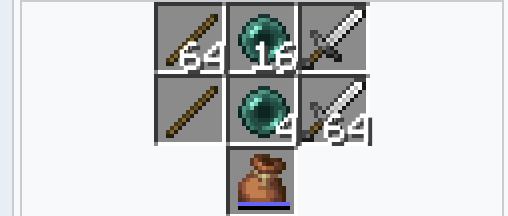
Item stack sizes (top row) and the number of bundle slots they take up (middle row). Sticks stack to 64, so they take up one bundle slot; ender pearls stack to 16, so they take up four; and swords do not stack, so they take up the whole bundle. So, for instance, a bundle may have 32 sticks and 8 ender pearls inside, which take up a total of (32×1)+(8×4)=64 bundle slots.
Creating an Optimizer
Using the MiniZinc Playground, we can model our player’s inventory and the constraints such that we free up the maximum number of inventory slots. That way, our player can pick up the most new items!
First, let’s create an inventory and let’s only focus on items that have full stacks. We can maximize our free inventory slots for this case, and then we will progressively make our way toward supporting all of the item types.
array[int] of int: inventory = [
  % fullstack of dirt
  64,
  % half of a fullstack of wood
  32,
  % half stack of a fullstack of  wool
  32,
  % quarter of fullstack of sticks
  16,
  % quarter of a fulstack of carrots
  16
];
If our optimizer was working, it would select three slots of our inventory to go in the bundle to maximize our free inventory space. We can model inventory selection by creating another array of integers of either 0 or 1, with 1 representing a selected slot in our inventory and 0 representing an unselected slot.
int: n = length(inventory);
array[1..n] of var 0..1: selected;
Once we have this array representing our selected slots, we can maximize the sum of our array in order to select the most slots possible.
solve maximize sum(i in 1..n)(selected[i]);
The full code now will look like this
% Use this editor as a MiniZinc scratch book
array[int] of int: inventory = [
  % fullstack of dirt
  64,
  % half of a fullstack of wood
  32,
  % half stack of a fullstack of  wool
  32,
  % quarter of fullstack of sticks
  16,
  % quarter of a fulstack of carrots
  16
];

int: n = length(inventory);
array[1..n] of var 0..1: selected;

solve maximize sum(i in 1..n)(selected[i]);
Our solver found the solution selected = [1, 1, 1, 1, 1]; to maximize our selected slots in our inventory, which means it selected every slot. This makes sense because we did not constrain it in any way. Let’s add some constraints so we can now make better-informed selections.
The constraint we are exceeding is our bundle capacity. If we include our bundle capacity in our model and constrain our selections to include only inventory items that do not exceed the bundle capacity, we can find a valid solution.
If we add this constraint to our model and run it again, we can see that it now only selects three inventory slots, and it selects slots that do not exceed the capacity of our bundle.
Great! Our initial model works for items that all stack to 64, but Minecraft has items with different maximum stack sizes. As mentioned earlier:
Items that stack to 64 (like dirt, sticks) take up 1 bundle slot per item
Items that stack to 16 (like ender pearls, snowballs) take up 4 bundle slots per item
Unstackable items (like tools, armor) take up 64 bundle slots (the entire bundle)
To handle this in our model, we need to represent each item’s bundle cost accurately. We’ll use a scaled representation to avoid decimal arithmetic:
int: units = 16 * 64;  % Total bundle capacity (1024 units)
int: fullstack = 1 * 16;  % Cost per fullstack item (16 units per item)
int: smallstack = 1 * 64;  % Cost per smallstack item (64 units per item)
int: unstackable = 16 * 64 + 1;  % Cost exceeds capacity (1025 units)
Why scale by 16? This gives us clean integer values:
1 dirt item = 16 units (1 bundle slot × 16)
1 ender pearl = 64 units (4 bundle slots × 16)
Total capacity = 1024 units (64 bundle slots × 16)
Now we can model a more realistic inventory:
array[int] of int: inventory = [
  % full stack of 64 dirt (takes entire bundle)
  64 * fullstack,  % 64 × 16 = 1024 units

  % full stack of 16 ender pearls (takes entire bundle)
  16 * smallstack,  % 16 × 64 = 1024 units

  % 1 pickaxe (can't fit with anything else)
  unstackable,  % 1025 units

  % half stack of 32 dirt (half a bundle)
  32 * fullstack,  % 32 × 16 = 512 units

  % half stack of 8 ender pearls (half a bundle)
  8 * smallstack,  % 8 × 64 = 512 units
];
and the rest of the model remains the same
int: n = length(inventory);
array[1..n] of var 0..1: selected;

constraint sum(i in 1..n)(selected[i] * inventory[i]) <= units;
solve maximize sum(i in 1..n)(selected[i]);
the full example:
int: units = 16 * 64;
int: fullstack = 1 * 16;
int: smallstack = 1 * 64;
int: unstackable = 16 * 64 + 1;

array[int] of int: inventory = [
  % stack of dirt
  64 * fullstack,
  % stack of ender pearls
  16 * smallstack,
  % pickaxe
  unstackable,
  % half stacks, should select these to maximize inventory space
  32 * fullstack,
  8 * smallstack,
];

int: n = length(inventory);
array[1..n] of var 0..1: selected;

constraint sum(i in 1..n)(selected[i] * inventory[i]) <= units;
solve maximize sum(i in 1..n)(selected[i]);
When we run this on the playground, we can see that it selects the last two slots, which correctly selects the maximum number of mixed items to store in a bundle.
Using MiniZinc, we can represent our problem declaratively, making it easy to extend and modify as needed. If game mechanics change or we want to support other storage systems like shulker boxes, we can simply update our constraints. This project was an enjoyable introduction to constraint satisfaction problems, and the MiniZinc Playground made it accessible without requiring any local setup.